

More Process Confirmation
Bring more departments and process owners into configuration reviews without turning the package into open-ended discovery.
Launch Business Central through an eight-week package designed for broader process configuration, reporting, permissions, migration preparation, structured UAT, role-based training, go-live and extended stabilization.
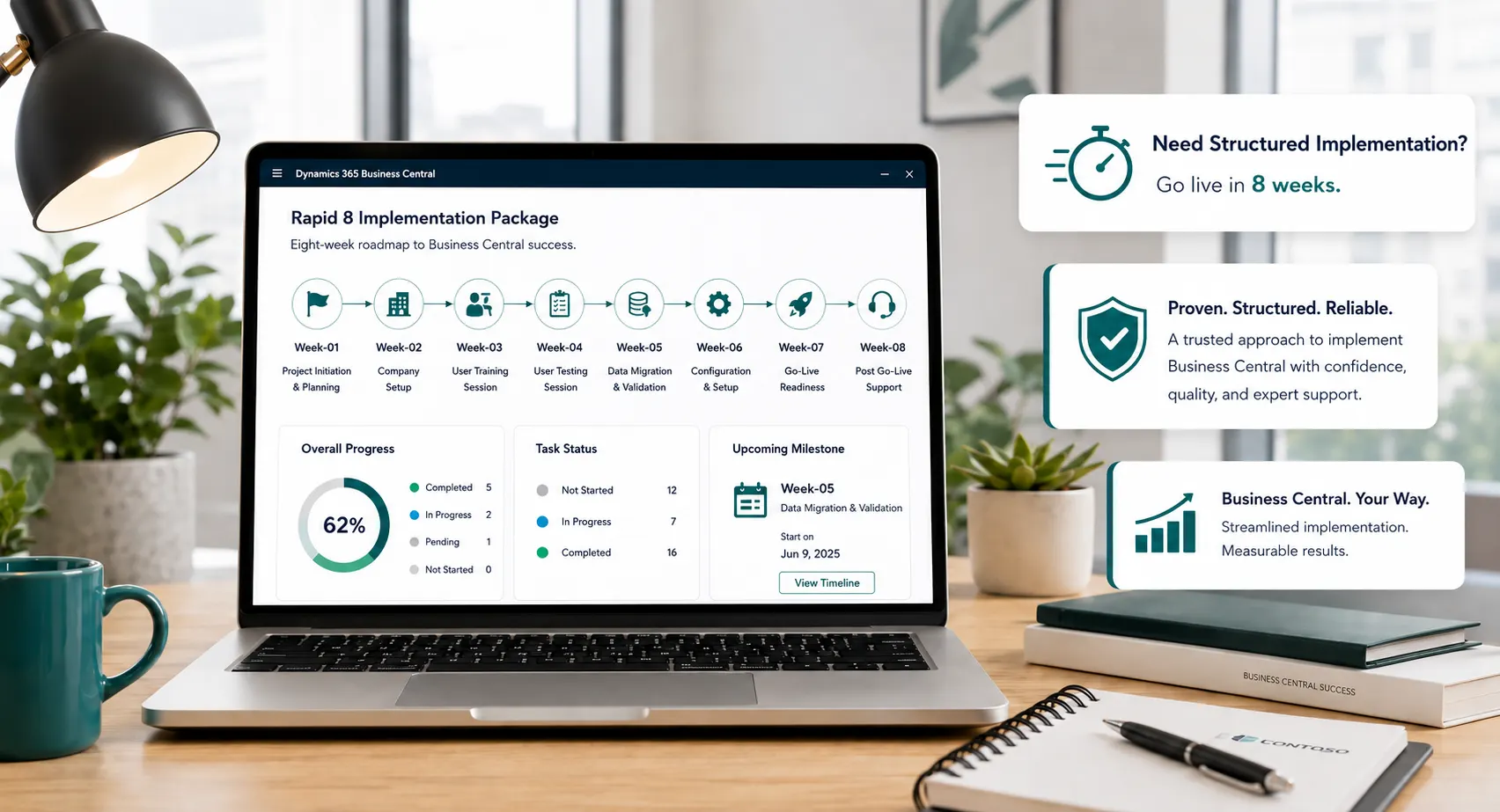
Rapid8 is a Leaforge package for organizations that still fit a controlled, standard-first implementation but need more time than Rapid5 for process confirmation, reporting, permissions, migration preparation, UAT, training and user adoption.
Rapid8 stays package-led, but creates more room than Rapid5 for broader confirmation, validation and user readiness before go-live.
Bring more departments and process owners into configuration reviews without turning the package into open-ended discovery.
Use dedicated time to validate standard reporting, dimensions, roles and access requirements before formal UAT.
Allow additional preparation, reconciliation and user acceptance across a broader set of approved scenarios and data.
Support more user groups through role-based training, cutover readiness and an extended package-defined stabilization period.
Rapid8 is an eight-week, package-led Leaforge implementation route for organizations that need broader configuration and validation than Rapid5 while still remaining within a defined Business Central scope.
The extra delivery time is used for wider department input, reporting and permission decisions, migration preparation, structured UAT, issue resolution, training, adoption and extended stabilization. Final scope, responsibilities and readiness are confirmed before Week 1.
Define the additional process areas, user groups, reporting, permissions, data responsibilities, milestones and decision deadlines before delivery begins.
Use the additional time to confirm reporting needs, access and migration preparation before formal UAT and go-live readiness.
Complete structured user acceptance, role-based training, cutover preparation, issue prioritization and package-defined extended stabilization.
Confirm package scope, process priorities, user groups, reporting, permissions, data responsibilities and delivery milestones. Prepare the Business Central environment and detailed implementation plan.
Configure agreed finance, sales, purchasing, inventory, banking and fixed-asset processes, plus the additional approved configuration that differentiates Rapid8 from Rapid5.
Confirm standard reporting requirements, role and access design, migration mappings, source-data quality and validation steps before UAT begins.
Load and reconcile agreed data, execute structured UAT across approved business scenarios, resolve priority issues, train user groups and confirm cutover readiness.
Complete final agreed migration and cutover, validate priority live transactions, support users, prioritize early issues and move into the package-defined stabilization period.
The Rapid8 schedule assumes confirmed scope, prepared source data, available process owners and decision-makers, attendance at configuration reviews, UAT and training, timely approvals and no material expansion of the agreed package requirements.
Provide a project owner, finance and operational process leads, and decision-makers who can review and approve work within the eight-week schedule.
Prepare and validate source data, identify day-one reports and confirm role/access decisions before migration and UAT milestones.
Make the required user groups available to execute approved UAT scenarios, resolve decisions and attend role-based training before cutover.
Protect the confirmed package boundaries and defer requirements that would materially expand the eight-week delivery route.
New or more complex requirements are assessed against the confirmed package scope. They can be deferred, separately estimated or moved into Full Implementation rather than forcing unsuitable work into the eight-week route.
Rapid8 is a strong fit when your requirements still suit a standard-first package, but Rapid5 does not provide enough time for the number of processes, reports, permissions, data-validation activities or user groups involved.
Choose Rapid8 when finance and operational processes involve more teams, approvals, permissions or department-level validation than a focused Rapid5 project.
The business still fits standard Business Central, but more process variations, reporting needs or operational decisions must be validated before go-live.
More time is required to map, cleanse, reconcile and validate the agreed migration data before user acceptance and cutover.
More user groups need structured UAT, role-based training, issue resolution and guided readiness before go-live.
Choose Rapid5 for a focused core scope with fewer users and simpler migration. Choose Rapid8 when the project remains package-led but needs more process confirmation, reporting, permissions, migration validation and user adoption. Choose Full Implementation for significant customization, complex integrations, process redesign, advanced manufacturing or warehouse requirements, extensive migration, multiple companies or phased rollout.
Rapid8 uses the same core Business Central foundation as Rapid5, but provides more delivery time for configuration depth, reporting, permissions, migration preparation, validation, UAT and user adoption. Final package scope is confirmed before Week 1.
The Rapid8 fee applies to the confirmed package boundaries. Microsoft licensing and any separately approved out-of-scope work remain outside the implementation fee unless explicitly included in the proposal.
One-time implementation fee
Rapid8 creates additional room for reporting, permissions, migration validation, UAT, training and adoption without turning the engagement into an open-ended custom project.
Additional process areas, reporting, permissions, data responsibilities and weekly outcomes are agreed before delivery.
The implementation fee applies to the agreed Rapid8 package boundaries; additional requirements are assessed separately.
The eight-week route creates more room for migration reconciliation, UAT, reporting and permission validation before cutover.
More user groups can participate in UAT, role-based training, go-live preparation and package-defined extended stabilization.

Rapid8 works when broader scope is controlled without becoming an open-ended ERP project. Leaforge keeps process decisions, reporting, permissions, migration, UAT, users and cutover activities aligned within the eight-week package route.
The goal is to use the extra three weeks deliberately: more validation and adoption where Rapid5 is too narrow, while keeping significant custom development and complex solution design in the appropriate Full Implementation route.
Confirm whether the extra process breadth, reporting, permissions, migration and user-readiness needs justify Rapid8—or whether Rapid5 or Full Implementation is more appropriate.
Each delivery stage has clear activities, customer responsibilities and readiness outcomes so the extra time is used deliberately rather than becoming open-ended discovery.
The Rapid8 package scope and fee are agreed before delivery; additions are assessed separately instead of being absorbed into the eight-week route.
Use the extra Rapid8 time for reporting, permissions, migration, UAT and user adoption while keeping the project package-led and standard-first.
More user groups validate approved business scenarios and receive training around the processes and responsibilities they will perform after go-live.
Use the package-defined stabilization period to resolve early issues, then prioritize future reporting, integrations, customization or additional capabilities through the right follow-on service.
Rapid8 focuses the initial project on the approved package scope. After stabilization, additional capabilities can be prioritized without destabilizing the eight-week delivery route.
Extend management reporting, analysis, Power BI or role-specific information beyond the agreed Rapid8 go-live requirements.
Add workflow automation, apps and Microsoft ecosystem improvements where they support an approved business requirement.
Scope upgrade-aware extensions or integrations separately when a requirement cannot be met appropriately within the Rapid8 package.
Understand the eight-week package scope, the difference from Rapid5, customer responsibilities, migration, UAT, training, licensing, scope changes and when Full Implementation is the better route.
Rapid8 is Leaforge’s eight-week package-led Business Central implementation route for organizations that need more configuration, reporting, permissions, migration validation, UAT, training and adoption support than Rapid5 while still fitting a controlled standard-first scope.
Rapid5 is designed for a focused core scope and a smaller key-user group. Rapid8 adds three weeks for broader process confirmation, reporting, permissions, migration preparation and validation, more structured UAT, additional user groups and extended stabilization.
Rapid8 is a strong fit when the project still suits a standard-first package but involves more departments, reports, permissions, data-validation work or user groups than a focused Rapid5 implementation.
Rapid8 typically covers core company and finance setup, cash and banking, payables, receivables, purchasing, sales, inventory, fixed assets, agreed reporting and permissions, package-defined migration, structured UAT, role-based training, cutover, go-live and package-defined extended stabilization. Exact scope is confirmed before Week 1.
Rapid8 allows more time than Rapid5 for mapping, cleansing, validation and reconciliation, but migration still follows an agreed package scope. Extensive historical data, multiple legacy systems or complex transformation and reconciliation should be assessed for Full Implementation or separately scoped work.
Small, clearly bounded requirements may be assessed where they do not undermine the package route. Significant AL development, multiple or business-critical integrations, major automation or process redesign should be delivered through Full Implementation or separately scoped work.
Approved business scenarios are validated through structured UAT with the relevant key users. Leaforge provides role-based training and readiness guidance, while the customer makes users available, resolves business decisions and confirms cutover readiness before go-live.
New requirements are assessed against the confirmed Rapid8 boundaries. If they cannot be accommodated without affecting the package route, they should be deferred, separately estimated or moved into Full Implementation.
Rapid8 covers Leaforge implementation services within the confirmed package scope. Microsoft Dynamics 365 Business Central licenses and third-party subscriptions are separate unless explicitly included in the commercial proposal.
Rapid8 remains a defined standard-first package. Choose Full Implementation when the project requires significant customization, multiple or business-critical integrations, process redesign, extensive historical migration, advanced manufacturing or warehouse requirements, complex multi-company needs or phased rollout.
Review your process breadth, reporting and permission needs, migration readiness, user groups, UAT and training requirements, and any integration or customization needs with Leaforge before committing to the eight-week route.