

FINANCIAL MANAGEMENT
Financial Management in Business Central
Connect general ledger, journals, dimensions, receivables, payables, banking, cash flow, budgets, fixed assets, cost accounting, multi-currency and reporting in one controlled Business Central finance model.
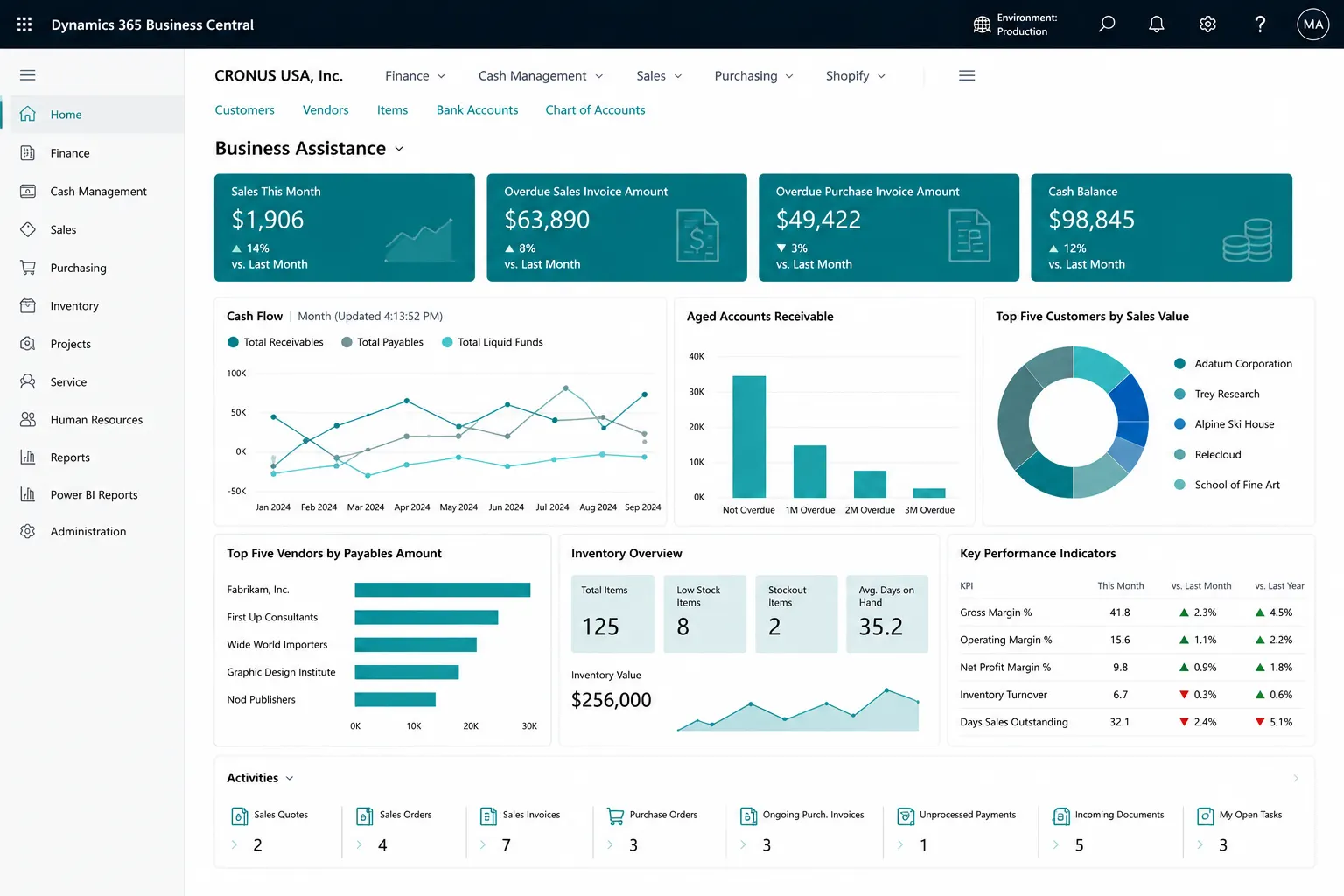
PROCESS & FIT
Build Finance Around a Controlled Posting and Reporting Model
Start with the chart of accounts, posting groups, dimensions, journals, tax/localization, banking, currency requirements, period-close procedures and reporting model before configuring automation or dashboards.
- General ledger, journals, posting groups & dimensions
- Receivables, payables, banking & reconciliation
- Budgets, fixed assets, cost accounting & financial reporting
- Multi-currency, intercompany & consolidation requirements
Finance Challenges Business Central Can Help You Address
Disconnected finance processes, spreadsheet-based controls and inconsistent posting can make close, reconciliation and management reporting harder than they need to be.
Posting groups and journal processes are poorly governed
Receivables, payables and bank entries require manual reconciliation
Cash-flow inputs are fragmented across systems or spreadsheets
Budgets and management reporting sit outside the ERP
Fixed assets, deferrals or cost control use separate records
Period close and audit evidence are difficult to trace
Multi-company, currency or consolidation reporting depends on manual work
Core Business Central Finance Capabilities
Build the accounting foundation around controlled posting, consistent dimensions and repeatable period processes. The exact setup should reflect your accounting policies, users, approval model and country/region requirements.
General Ledger & Chart of Accounts
Structure G/L accounts, account categories and posting rules so operational transactions flow into a controlled financial model.
Posting Groups
Control how customers, vendors, inventory, VAT/tax and other business transactions post into the general ledger.
Dimensions
Analyze transactions by department, branch, project, product line, business unit or other management dimensions without over-expanding the chart of accounts.
General & Recurring Journals
Post adjustments, accruals and recurring entries with reusable journal structures, balancing controls and recurring posting logic.
Allocations
Allocate journal amounts across accounts, dimensions or cost structures using defined allocation rules where appropriate.
Deferrals
Schedule revenue or expense recognition across future accounting periods instead of recognizing the full amount at once.
Receivables, Payables, Banking and Cash Management
Connect customer collections, vendor payments and bank activity to the same finance model used for posting and reporting.
Accounts Receivable
Track customer ledger entries, open balances, due dates, applications, aging, statements and collection-related activity.
Accounts Payable
Manage vendor ledger entries, open invoices, credit memos, due dates, aging and planned payment activity.
Payment Terms, Discounts & Tolerances
Configure due-date rules, payment discounts and payment tolerances to support consistent receivable and payable processing.
Bank Accounts & Reconciliation
Maintain bank accounts and reconcile Business Central entries with statement activity to identify differences and missing transactions.
Payment Journals & Payment Reconciliation
Prepare outgoing payments and review incoming bank activity, payment applications and reconciliation using the available banking workflow.
Cash Flow Forecast
Build cash-flow visibility from configured receivables, payables, liquid funds and other forecast sources and assumptions.
Financial Planning, Asset Management and Cost Control
Extend day-to-day accounting with budgets, asset accounting, cost analysis and currency management.
G/L Budgets
Create finance budgets and compare actual results against budget by account, period and relevant dimensions.
Fixed Assets
Manage asset cards, acquisition, depreciation, maintenance-related information, transfers and disposal accounting based on the configured books.
Cost Accounting
Analyze and allocate costs using cost types, cost centers, cost objects, cost entries, allocations and cost budgets where the process requires a dedicated cost-accounting model.
Multi-Currency Transactions
Process customer, vendor, bank and general-ledger activity in foreign currencies with exchange rates and exchange-rate adjustments.
Additional Reporting Currency
Maintain an additional reporting currency for financial reporting scenarios where a second currency view is required.
Posting Dates & Accounting Periods
Control allowable posting dates, define accounting periods and organize period-end and fiscal-year close activities.
Multi-Company Finance, Intercompany and Consolidation
Support organizations that operate across multiple Business Central companies, currencies or reporting structures.
Multiple Companies
Maintain separate companies/legal entities while standardizing finance design, dimensions, reporting practices and governance where appropriate.
Intercompany Transactions
Process supported intercompany sales, purchase and general-journal activity between configured Business Central companies or partners.
Financial Consolidation
Combine balances from business units or companies into a consolidation company for group-level financial reporting and review.
Tax, VAT & Localization
Configure the tax/VAT and statutory functionality available for the applicable country/region, with localization, apps or integrations where additional compliance is required.
Financial Reporting, Analysis and Period Control
Turn posted finance data into financial statements, operational analysis and a more traceable month-end or year-end process.
Financial Reports
Build income statement, balance-sheet and management reports using financial report definitions, rows, columns, periods and dimension filters.
Account Categories & Financial Structure
Use account categories and a structured chart of accounts to support standardized financial statement presentation and analysis.
Analysis Mode & Excel
Analyze finance data interactively and use Excel-supported reporting or analysis workflows where they fit the requirement.
Power BI
Extend finance analysis into Power BI where licensing, security, data model and refresh requirements are defined.
Period-End & Year-End Close
Coordinate journals, bank checks, reconciliations, adjustments, accounting periods and fiscal-year closing activities in a controlled process.
Audit & Posting Traceability
Use posted entries, source/reason information, document references and configured change tracking to support transaction traceability and review.
Finance Fit, Licensing and Localization Matter
Availability and configuration of tax, banking, e-invoicing, regulatory, consolidation, analytics and localization capabilities can vary by country/region, Business Central environment, licensing and extensions. Payroll, expense management, specialist treasury and other requirements may need separate apps or integrations. The finance design should always be validated against the organization’s accounting, statutory and control requirements.
What Better Financial Control Can Look Like
The goal is not simply more finance functionality. It is a controlled accounting model with clearer ownership, faster reconciliation and reporting that finance and management can trust.
Consistent Posting Control
Standardize the accounts, posting groups, journals and dimensions used across day-to-day transactions.
Stronger AR/AP Visibility
See open balances, aging, due dates, applications and exceptions without maintaining parallel spreadsheets.
Better Bank Reconciliation
Bring bank balances, statement activity and payment application into a repeatable reconciliation process.
Budget & Cost Visibility
Compare actual results with budgets and analyze costs by the structures that matter to management.
Asset Accounting in the ERP
Keep acquisition, depreciation and disposal-related asset accounting connected with finance.
Multi-Company Control
Design currencies, intercompany activity and consolidation around a clearer group-finance process.
More Controlled Period Close
Improve traceability of adjustments, journals, reconciliations and the evidence used during close and review.
More Useful Financial Reporting
Use dimensions, financial reports, Excel and analytics to provide decision-ready finance information.
Finance Assessment Questions
Where Business Central Finance Can Fit Well
Chart of accounts • Posting groups • Dimensions • Journals • AR/AP • Banking/reconciliation • Cash flow • Budgets • Fixed assets • Cost accounting • Multi-currency • Intercompany • Consolidation • Period close • Financial reporting.
Requirements to Validate Before Design
Legal entities and countries • Local tax/VAT • E-invoicing • Banking formats • Approval controls • Group consolidation • Historical-data needs • Payroll/expense/treasury requirements • External integrations • Reporting and Power BI requirements.
Why Leaforge for Business Central Finance
Leaforge helps translate accounting requirements into a Business Central finance model that remains understandable, controlled and practical for day-to-day users.
Frequently Asked Questions
Common questions about Business Central financial management. Final capability and setup depend on country/region, licensing, data, integrations and the organization’s accounting requirements.
Can Business Central manage dimensions?
Yes. Dimensions let you analyze entries by areas such as department, branch, project, product line or business unit without unnecessarily expanding the chart of accounts.
Does Business Central support recurring journals and deferrals?
Yes. Recurring journals can support repeatable postings, and deferrals can spread revenue or expense recognition across future accounting periods. The setup should follow the organization’s accounting policies.
Can Business Central reconcile bank accounts and incoming payments?
Yes. Business Central includes bank reconciliation and payment-reconciliation processes. Available bank feeds, file formats and automation can vary by bank, country/region and extensions.
Does it support budgets and budget-versus-actual analysis?
Yes. G/L budgets can be created and analyzed against actual finance results, including the dimensions and reporting structures used by the organization.
Are fixed assets included?
Yes. Business Central includes fixed-asset management and accounting such as acquisition, depreciation, transfers and disposal, based on the configured depreciation books and local requirements.
Does Business Central include cost accounting?
Yes. Business Central includes cost-accounting functionality for cost types, cost centers, cost objects, allocations, cost entries and cost budgets. Whether it should be used depends on the organization’s management-accounting requirements.
Can Business Central work with multiple currencies?
Yes. Business Central supports foreign-currency transactions, exchange rates and exchange-rate adjustments. An additional reporting currency can also be configured for applicable reporting scenarios.
Can it handle intercompany transactions and consolidation?
Business Central supports intercompany processes and company consolidation. The design should be assessed carefully when companies use different charts, currencies, localizations or reporting structures.
Can financial reports be customized?
Yes. Financial reports can be designed with row and column definitions, periods and dimensions. Excel and other reporting approaches can also be used where they fit the requirement.
Can Power BI use Business Central finance data?
Yes. Power BI can be used for richer finance and operational analysis. Licensing, permissions, semantic model, refresh frequency and any cross-system data should be designed for the intended audience.
How should period-end and year-end close be designed?
Define accounting periods, allowable posting dates, journal and reconciliation responsibilities, adjustment procedures, reporting checks and fiscal-year close steps so the process is repeatable and auditable.
What finance data should be migrated?
Typical migration includes finance master data, opening balances and agreed open customer, vendor, bank and G/L information. Historical-detail requirements should be confirmed during discovery instead of migrating every legacy transaction by default.
Build a Stronger Business Central Finance Foundation
Share your chart of accounts, dimensions, journals, AR/AP, banking, currencies, close process, budgets and reporting needs. We can help define a finance model that stays controlled, understandable and ready for growth.