

MICROSOFT 365 & POWER PLATFORM
Microsoft 365 & Power Platform with Business Central
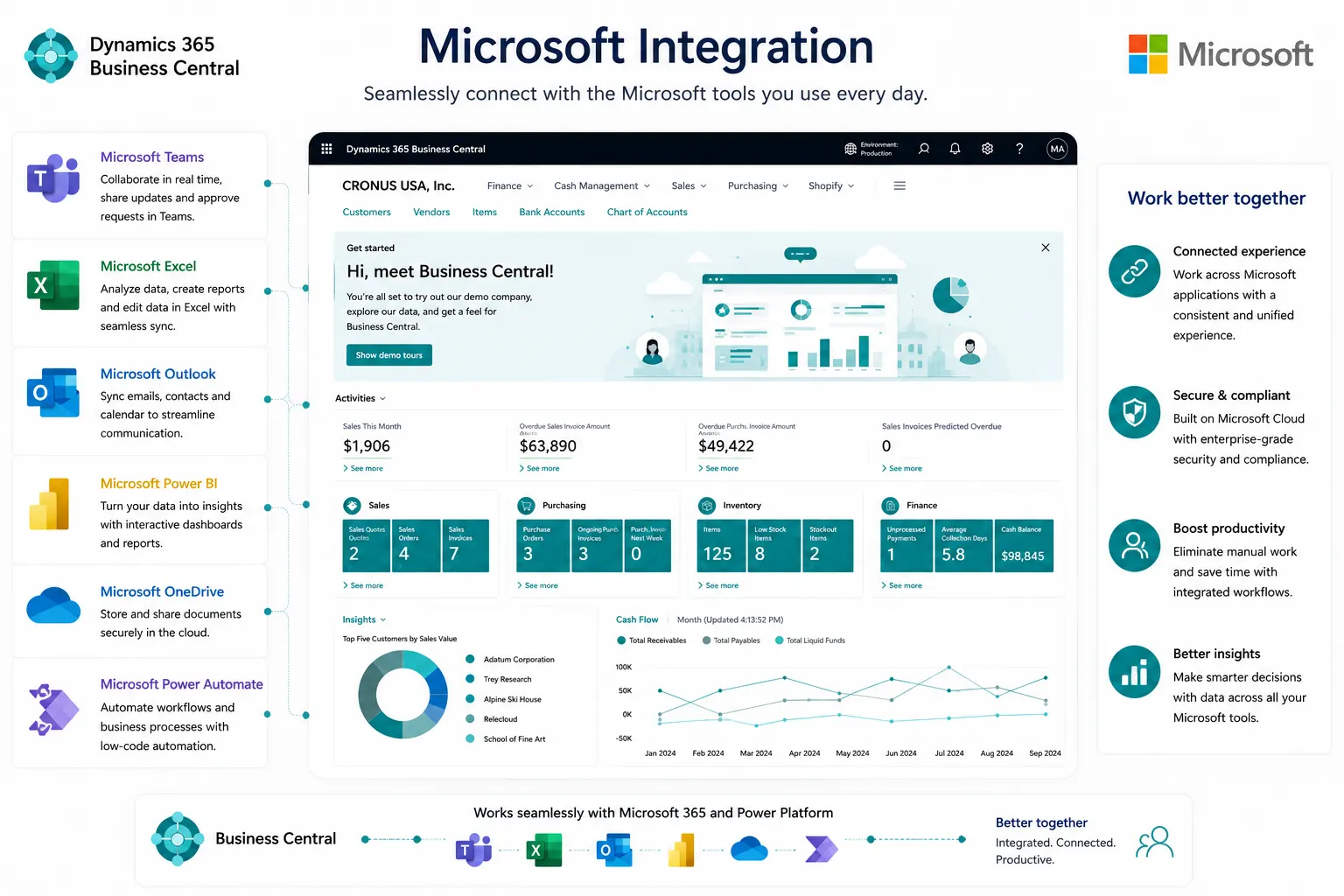
Extend Business Central work into Outlook, Excel, Teams, Power Automate, Power Apps, Dataverse and Power BI—using the right connector, permissions and licensing for each scenario.
PROCESS & FIT
Use Microsoft Tools for the Work They Do Best
Business Central integrates with Microsoft 365 and Power Platform, but each tool has a different role. Design the process around data ownership, write permissions, security, licensing and support rather than adding apps simply because they are available.
- Outlook add-in/contact synchronization
- Edit/Open in Excel
- Teams record sharing/contact lookup
Where Disconnected Microsoft Tools Create Extra Work
Disconnected processes, manual workarounds and inconsistent data can make day-to-day control harder than it needs to be. These are common signs that the current process deserves a closer look.
Approvals are outside the process
Simple role experiences need focused UI
Teams collaboration loses ERP context
Power Apps/flows are built without ownership
Dataverse synchronization creates duplicate masters
Licensing/security is unclear
How Business Central Can Work with Microsoft 365 & Power Platform
Business Central can bring these activities into a more connected working environment. The exact configuration should reflect your processes, users, controls, reporting and integration needs.
Outlook add-in/contact synchronization
Edit/Open in Excel
Teams record sharing/contact lookup
Power Automate workflows
Power Apps using Business Central connector
Dataverse synchronization
Power BI integration
APIs/connectors
Power Pages scenarios where supported
Microsoft Integration Does Not Remove Licensing and Governance Requirements
Business Central, Microsoft 365, Teams, Power Automate, Power Apps, Dataverse, Power BI and Power Pages can each have separate licensing/use rights. Microsoft 365 Business Central access is read-only through supported Teams experiences. Power Platform solutions still require security, connector, environment and support governance.
What a Connected Microsoft Experience Can Help You Achieve
The goal is clearer day-to-day control, more consistent information and better visibility of the transactions and exceptions that matter to your team.
Defined data owner
Approved connector/API
Read/write rights
License assumptions
Automation owner
Error/exception handling
Security roles
Deployment/support model
Reporting ownership
A Governed Extension Approach
Where Microsoft Integration Can Add Value
Connect → Automate → Extend → Govern. Start with the user/process need, then choose Outlook/Excel/Teams/Power Automate/Power Apps/Dataverse/Power BI based on the task and required data rights.
Licensing, Security and Data Requirements to Review
Business Central, Microsoft 365, Teams, Power Automate, Power Apps, Dataverse, Power BI and Power Pages can each have separate licensing/use rights. Microsoft 365 Business Central access is read-only through supported Teams experiences. Power Platform solutions still require security, connector, environment and support governance.
Why Leaforge for Microsoft 365 & Power Platform with Business Central
Leaforge helps connect Business Central with Outlook, Excel, Teams, Power Automate, Power Apps, Dataverse and Power BI using a process-first approach that keeps data ownership, permissions, licensing and support responsibilities clear.
Frequently Asked Questions
Here are answers to common questions about Business Central with Microsoft 365 and Power Platform. The right approach can vary depending on your processes, data, licensing and integration requirements.
What can Business Central do in Outlook?
Supported Outlook experiences can surface Business Central customer or vendor information and help users work with relevant sales or purchasing information without switching constantly between applications.
Can data be edited in Excel?
For supported pages and permissions, Edit in Excel can let users make changes in Excel and publish those changes back to Business Central. The feature should be used with appropriate permissions and data controls.
Can Business Central records be shared in Teams?
Yes. Supported Teams integration can display Business Central record information in collaboration scenarios, subject to the user’s permissions and licensing.
Can Power Automate use Business Central?
Yes. Power Automate can use the Business Central connector and supported APIs to trigger or perform approved workflow actions, depending on the scenario and permissions.
Can Power Apps read/write Business Central data?
Power Apps can work with Business Central through supported connectors and APIs. Read/write behavior depends on the app design, Business Central permissions and the applicable Microsoft licensing.
What is Dataverse synchronization?
Dataverse synchronization lets selected Business Central and Dataverse data be mapped and synchronized for supported scenarios. The design should define which system owns each data set and how conflicts or errors are handled.
Is Power BI licensing separate?
Power BI licensing can be separate from Business Central licensing, depending on how reports are created, shared and consumed. Confirm the required licenses for the intended users.
Can Microsoft 365 users write to Business Central?
A Microsoft 365 license by itself does not provide general write access to Business Central. Supported Microsoft 365 access to Business Central is read-only in the relevant Teams experience; users who need to transact must have the appropriate Business Central rights and licensing.
When should Power Pages be used?
Power Pages can be considered for external or portal-style experiences when the use case, data, security and licensing fit the platform. It should be chosen because it suits the process, not simply because Business Central data needs to be exposed.
Connect Business Central with the Right Microsoft Tools
Tell us where users leave Business Central today to email, approve, analyze, collaborate or enter simple data. We can help choose a governed Microsoft 365 or Power Platform integration.